
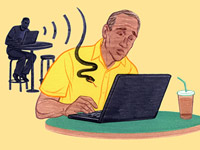
 Wi-Fi is been offered in more and more public places. America currently has more than 220,000 Wi-Fi hotspots. Which we see as a good thing but can also come with many security risks. When you are using public Wi-Fi people in the same hotspot may be able to open and read your messages that are "unencrypted" in the airwaves. Even if the network does use encryption are not always completely safe. People who know how to set up free Wi-Fi can easily do this and then hack into people that use this Wi-Fi laptops. These people can then obtain people's personal information or passwords. Once you use this fake free Wi-Fi your computer can automatically join it in the future.
  There are certain pre-cautions a person can take to protect themselves when using public wireless networking. First, you can make sure your computer has a hardware firewall. Second, use public Wi-Fi just for internet browsing. So do not use public Wi-Fi to purchase things or any other thing that someone could access your personal information from. Third, when you are in a public place look around for signs that say what the Wi-Fi is. Only join this Wi-Fi and no other one that might be available to use. Fourth, turn off shared folders so hackers can not hack into your computer and upload malware to your computer. Lastly, change your Windows Wireless Network Connection properties from "Automatic Connection" to "On Demand". By doing this you can avoid your computer by automatically joining the unsafe Wi-Fi.
 http://www.support.com/blog/post/7-simple-precautions-you-should-take-when-using-public-wi-fi#sthash.fnEmWh59.dpuf

No comments:
Post a Comment